Screw Tool
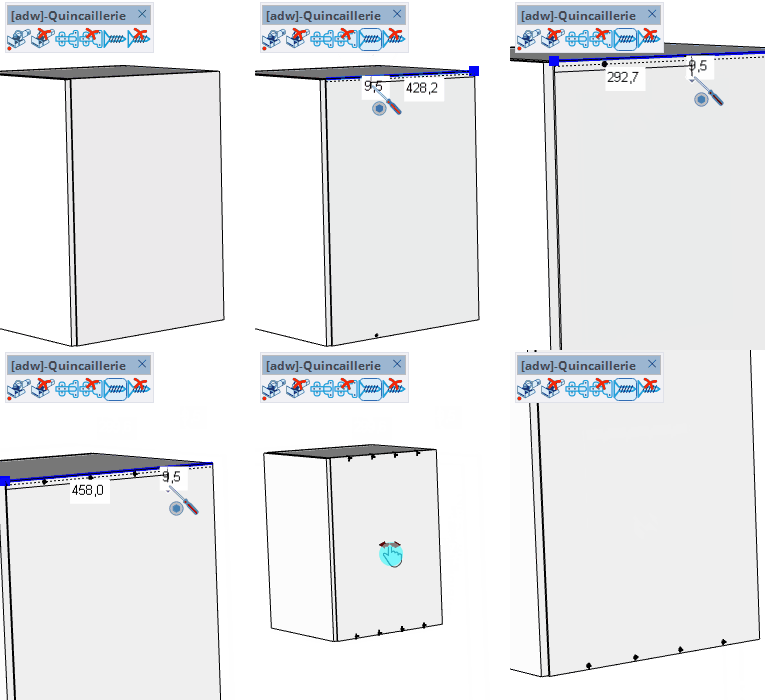
Place screws on panel faces by hovering near an edge โ the tool snaps to the edge and positions the screw at the set distance from it.
How it works
- Select a screw component in the component selector that opens automatically
- Hover over a panel face near an edge โ the screw preview snaps to the closest edge
- Click to place the screw at the current position
- Type a distance in the VCB to position the screw precisely from the reference point
Keys
- Ctrl / Option = Cycle the reference point to the next vertex on the edge
- โ = Toggle free positioning mode (ignore edge snapping)
- Esc = Cancel the operation
VCB Input
- Normal:
distance โ set the distance from the reference point along the edge
- After two screws:
Nx or N/ โ multiply or divide spacing to add N additional screws
Tips
- The component selector opens automatically โ choose the screw type before placing
- A dimension line shows the current distance from the reference point while hovering
- Use Ctrl/Option to change which vertex serves as the reference point for distance measurement
- The parement distance (offset from edge) can be typed directly into the VCB when no face is hovered