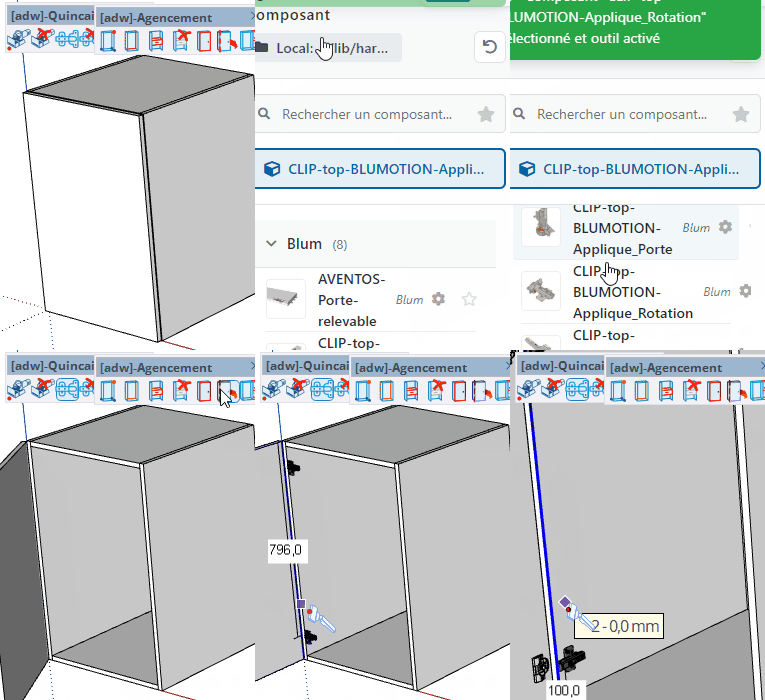
Hardware Tool
Place hardware components (hinges, handles, drawer slides…) on a panel face, snapped to a reference edge.
How it works
- Select a hardware component from the component list
- Click (and briefly hold) on a panel face to set the reference edge — the view zooms to the face
- Enter the start position and gap in the VCB, then confirm
- Use Up arrow to symmetrize the placement on the opposite side
Keys
- Ctrl = Change the reference point
- Alt = Toggle snapping
- Up arrow = Symmetrize placement
- + / − = Increase / decrease number of hardware pieces
- Esc = Cancel the operation
VCB input
- Start position and gap:
start_position ; gap
- Parement distance: distance from the reference face
- Partial entry: a parameter left empty keeps its current value —
12 changes only the 1st parameter, ;0.2 only the 2nd.
Tips
- The hardware component must be selected in the component list before activating the tool
- Ctrl cycles through available reference points on the edge
- The parement distance is set per hardware definition and can be edited in the component attributes
- Hardware placements are stored in the panel and exported to CNC