Remove Hardware Tool
Hardware

Remove Hardware Tool

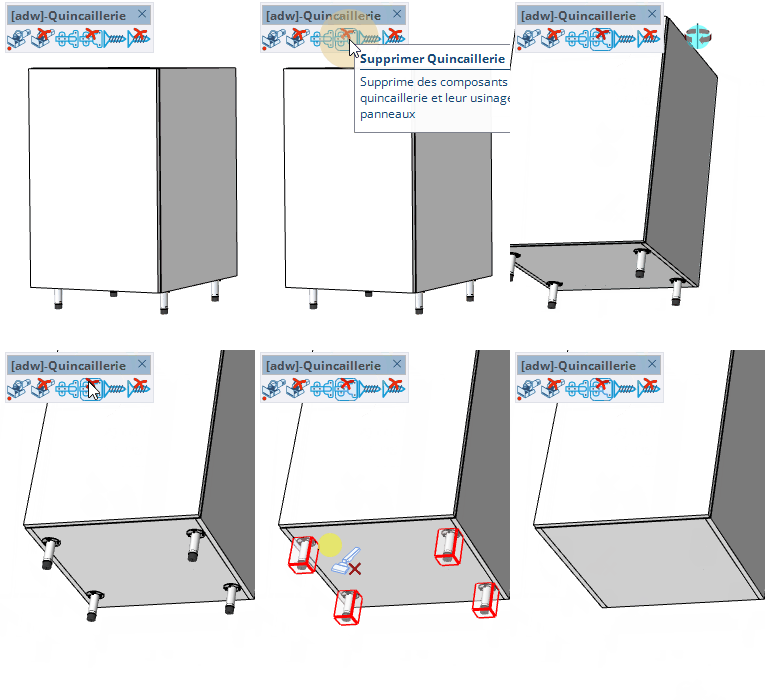
Remove hardware components (hinges, handles, slides…) placed on panels by hovering over the closest part then clicking.
Video demonstration

Demonstration

Delete Hardware Tool

Remove hardware parts (hinges, handles, slides…) from panels by hovering the nearest part and clicking.

How it works

  1. Hover a face close to the hardware part you want to delete: the nearest hardware is highlighted
  2. Click to delete the highlighted hardware and its machining
  3. Hold Shift to also select all identical hardware parts on the same panel, then click to delete them together

Keys

  • Shift = Select all identical hardware parts on the current panel
  • Esc = Cancel the operation

Tips

  • Deletion also removes the associated machining on the panel
  • A single Ctrl+Z restores both the hardware and its machining
  • Move the mouse away from any hardware part to release the current selection preview

Try this tool for free

AD Wood Free Trial

Fill out this form to receive your free download link.

Thank you for your request!

Your download link is ready. The download will start automatically.

Download Now