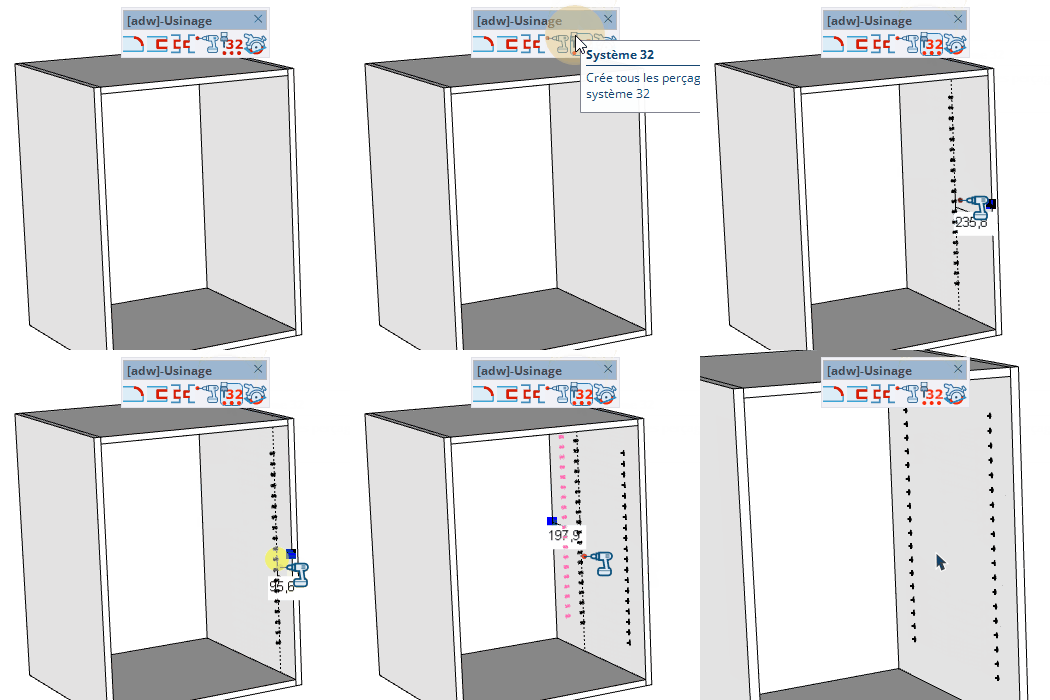
System 32
Create a series of evenly spaced drillings along a panel edge, following the System 32 standard (32 mm spacing).
How it works
- Without hovering any part, enter the drilling dimensions (diameter;depth)
- Hover an edge on a panel and enter the distance from the edge
- Click to place the row of drillings
- Double-click to re-create the drilling at the same distance
Keys
- Shift = Lock the reference edge
- + / - = Increase / decrease the number of drillings
- Alt / Command = (off a face) Switch between diameter;depth and starting point;spacing
- Ctrl / Option = Change the reference point
- Esc = Cancel the operation
VCB input
- Without hovering a face: enter diameter;depth (e.g. 8;19)
- With Alt: enter starting point;spacing (e.g. 64;32)
- Hovering an edge: enter the distance from the edge
- Partial entry: a parameter left empty keeps its current value —
12 changes only the 1st parameter, ;0.2 only the 2nd.
Tips
- Depth is automatically capped at the panel thickness
- The number of drillings adapts to the edge length; adjust it with + / -
- Double-click repeats the last drilling at the kept distance