Circular Saw Tool
Cut selected panels in two along a reference face, with adjustable blade kerf and angle.
How it works
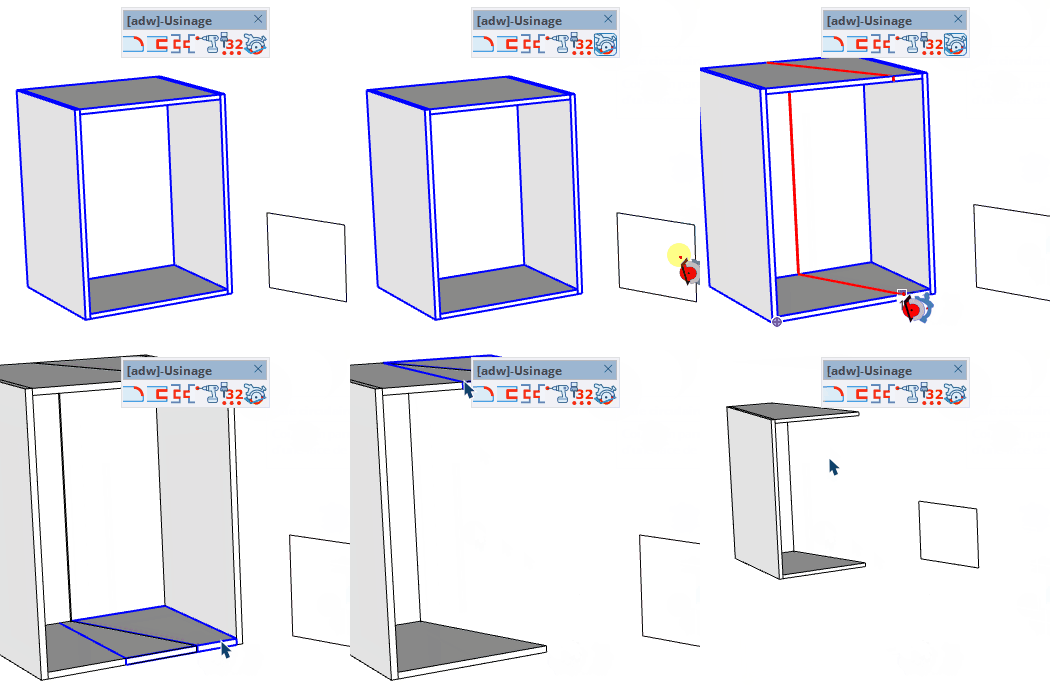
- Select the panels to cut, then activate the tool
- Click on a reference face to define the cut plane
- Click a cut point to perform the cut
Keys
- Ctrl = Invert the saw direction (flip which side is removed)
- Esc = Cancel the operation
VCB Input
- Before selecting a face: type a value to set the blade kerf (saw thickness)
- On an edge: type a distance to position the cut precisely from the reference vertex
- On a face: type rotation;tilt in degrees to angle the cut plane
- Partial entry: a parameter left empty keeps its current value —
12 changes only the 1st parameter, ;0.2 only the 2nd.
Tips
- The tool must have a selection before activation — select panels first
- If panels share a definition, you will be asked to make them unique before cutting
- The blade kerf creates two parallel cut planes separated by the specified thickness
- The cut preview shows the section lines in real time as you move the cursor