Tongue & Groove Tool
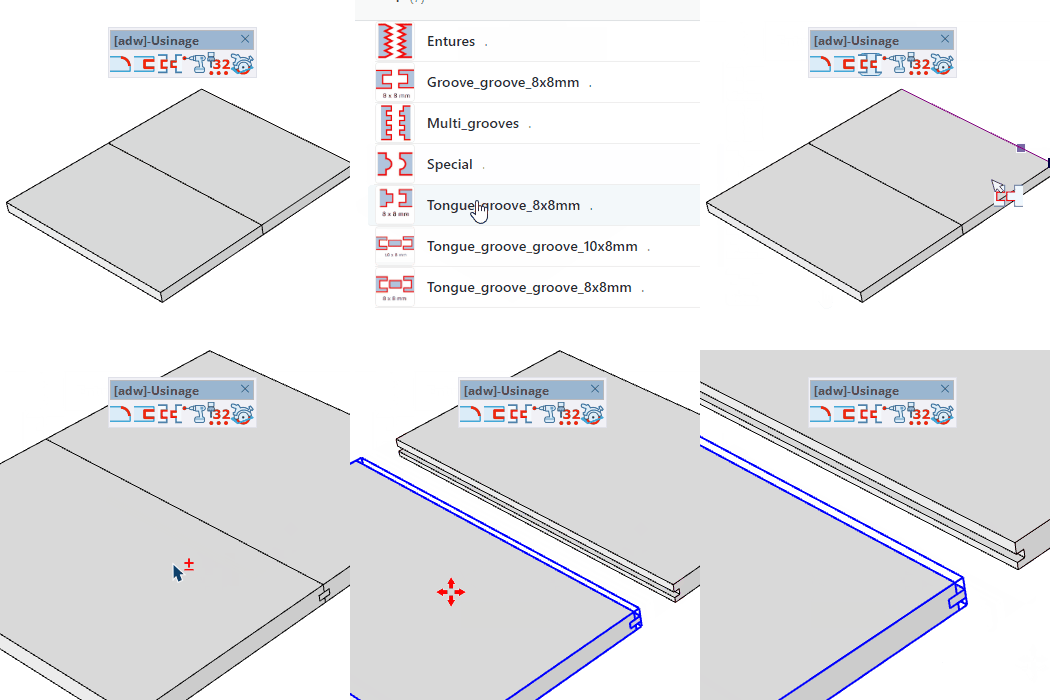
Create a tongue-and-groove joint along the edge shared by two connected panels.
How it works
- Select the machining profile (model) in the component selector
- Set the shoulders and the offset distance in the VCB
- Click on a panel face connected to another panel to place the joint along the shared edge
Keys
- Ctrl = Switch the reference end along the edge
- Esc = Cancel the operation
VCB input
- Without hovering a face: enter the offset distance between the groove and the facing
- Over a face and edge: enter the two shoulders (e.g. 10;10)
- Partial entry: a parameter left empty keeps its current value —
12 changes only the 1st parameter, ;0.2 only the 2nd.
Tips
- The joint is placed along the edge shared by the two panels
- The offset distance must be greater than 0
- The closest parallel edge is detected automatically as you hover