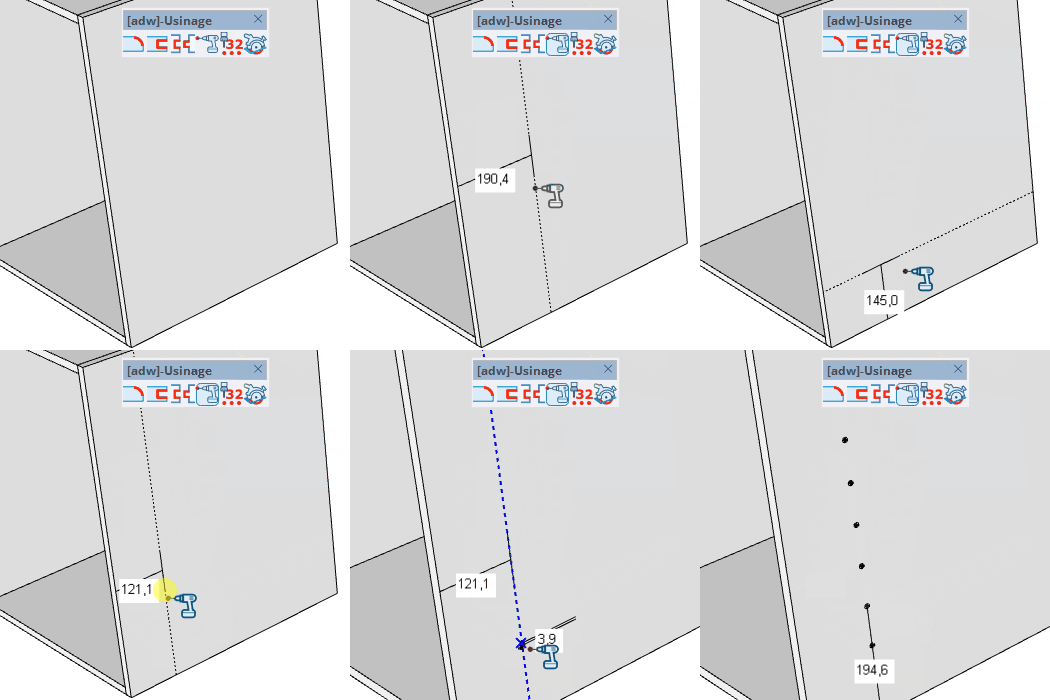
Drilling Tool
Place one or more drillings on a panel face with precise diameter, depth, and edge offset control.
How it works
- Before hovering a panel, type diameter;depth to set the drill parameters
- Click on a panel face to set the offset distance from the reference edge
- Move along the edge and click to place each drilling
Keys
- Shift = Snap to regular drill positions along the edge
- Esc = Cancel the operation
VCB Input
- No face hovered: type diameter;depth to change drill size (e.g. 8;19)
- After setting offset: type a distance to reposition the last drilling precisely
- After a drilling: type ×N or /N to multiply or divide the spacing
- Partial entry: a parameter left empty keeps its current value —
12 changes only the 1st parameter, ;0.2 only the 2nd.
Tips
- The depth is automatically capped to the panel thickness if it exceeds it
- The offset distance is measured from the closest parallel edge
- Click without moving to repeat the last drilling at the same offset