Subset Tool
Cabinetmaking / Boxes

Subset Tool

Place subset hardware components in panel cavities โ€” the tool detects available space and adapts the subset automatically.
Video demonstration

Subset Tool demo

Subset Tool

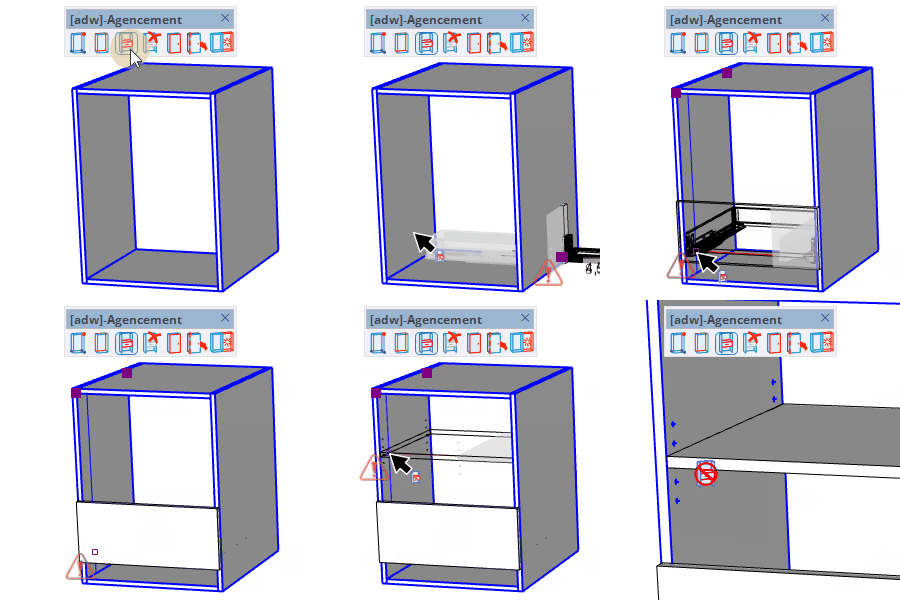
Place hardware subset components into panel cavities โ€” the tool detects the available space and auto-fits the subset. Select the component type in the component selector.

How to use

  1. Select a subset component in the component selector that opens automatically
  2. Hover over a panel face near an edge โ€” the subset preview fits to the detected cavity
  3. Click to insert the subset at the current position
  4. Type a distance in the VCB to position the subset precisely from the base point along the blue axis

Keys

  • Alt = Toggle snap mode
  • Ctrl = Toggle from bottom/top reference
  • โ†’ = Mirror along red axis
  • โ† = Mirror along green axis
  • โ†‘โ†“ = Mirror along blue axis
  • Esc = Cancel the operation

Tips

  • The component selector opens automatically โ€” choose the subset type before placing
  • Arrow keys flip the subset orientation along each axis
  • Right-click to toggle between centered and free position mode
  • A warning is shown when the host component should be made unique before inserting

Try this tool for free

AD Wood Free Trial

Fill out this form to receive your free download link.

โœ“

Thank you for your request!

Your download link is ready. The download will start automatically.

Download Now