Cabinet Tool
Quickly create cabinets with precise dimensional control.
How It Works
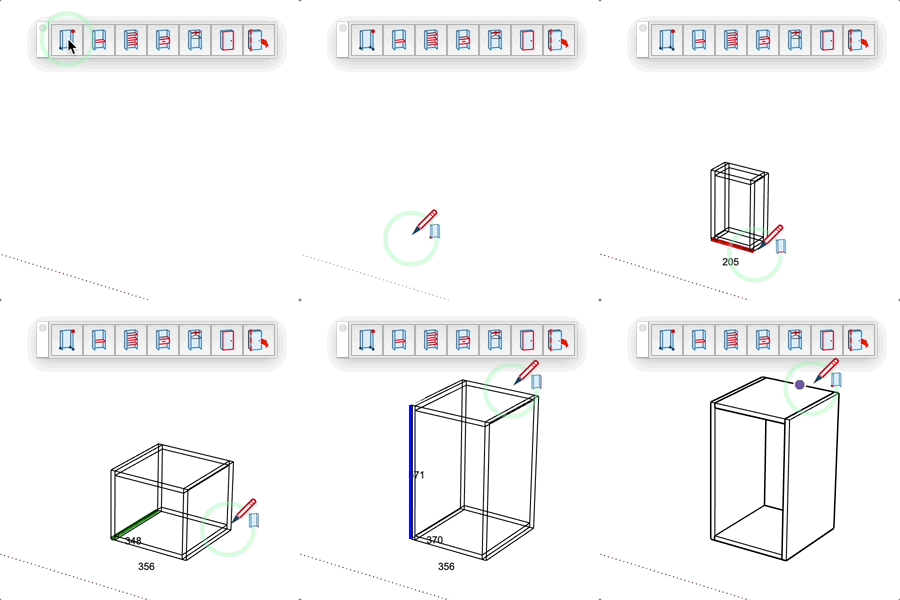
- Define the insertion point (lower corner)
- Define the width (red line)
- Define the depth (green line)
- Define the height (blue line)
Parameters
- Thickness: Enter the panel thickness before starting
- Dimensions: Enter a precise value at each step
- Alt(PC) / Command(Mac) : Toggle between "stud on rail" and "rail on stud"
- Ctrl(PC) / Option(Mac) : Create in a component
Tips
- Dimensions are displayed in real-time
- Cabinet preview at each step
- Height always follows the Z axis
- For upper cabinets, start from the lowest point
VCB input
- Format:
Width ; Depth ; Height
- Partial entry: a parameter left empty keeps its current value —
12 changes only the 1st parameter, ;0.2 only the 2nd, ;;0.4 only the 3rd.