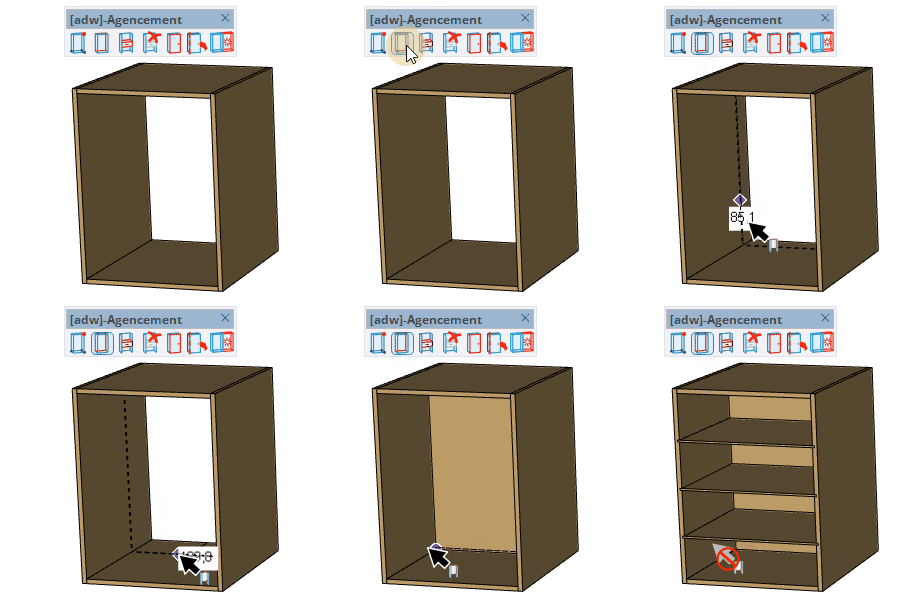
Internal Panel Tool
Insert internal vertical panels (shelves, dividers) inside a cabinet or assembly by clicking on a reference face.
How it works
- Select the board type and material from the panel selector that opens automatically
- Hover over a face inside a cabinet — the closest edge highlights and a panel preview appears
- Type a distance value in the VCB to position the panel precisely from the edge, then click to place it
- Use + / − to add multiple panels distributed evenly, then enter start position and gap
Keys
- Alt = Cycle snapping mode (free / snap to grid / snap to reference points)
- Shift = Lock the current reference edge
- + = Add one more panel
- − = Remove one panel
- Esc = Cancel the operation
VCB input
- On a face (single panel): distance from the closest edge
- On a face (multiple panels):
start_position ; gap
- Off a face: grooving depth for the panel dado
- Partial entry: a parameter left empty keeps its current value —
12 changes only the 1st parameter, ;0.2 only the 2nd, ;;0.4 only the 3rd.
Tips
- The panel thickness and material are set in the board selector dialog
- Multiple identical panels share the same component definition automatically
- The grooving depth (VCB when not hovering a face) sets how deep the dado groove is cut into surrounding panels
- Shift locks the reference edge so you can move the cursor freely without changing the orientation