Solid Wood Tool
Solid Wood

Solid Wood Tool

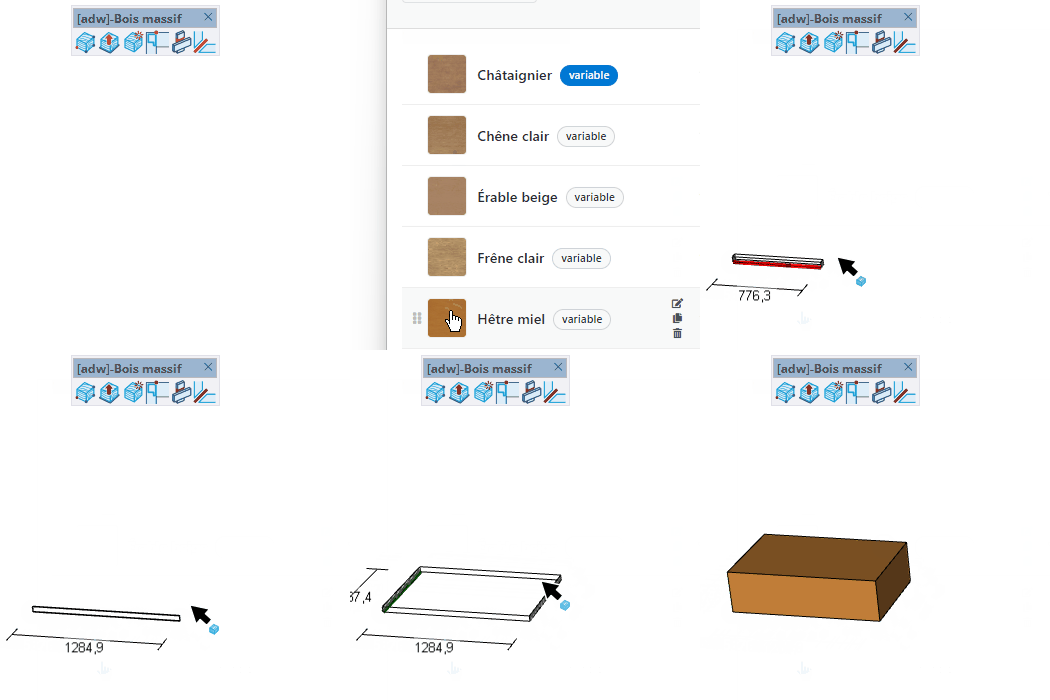
Draw a solid wood part by clicking four points — insertion point, length, width and thickness. Choose the material and board data in the selector that opens automatically.
Video demonstration

Solid Wood Tool demo

Solid Wood Tool

Draw a solid wood piece by clicking four points — insertion point, length, width, and thickness. Choose material and board data in the board selector that opens automatically.

How to use

  1. Select material in the board selector that opens automatically
  2. Click to set the insertion point
  3. Move and click to define the length (horizontal)
  4. Move and click to define the width (perpendicular to length)
  5. Move and click to define the thickness (vertical) — or type each value in the VCB

Keys

  • Right arrow = Lock length along the red (X) axis
  • Left arrow = Lock length along the green (Y) axis
  • Up / Down arrow = Lock length along the blue (Z) axis
  • Press the same arrow again to release the lock
  • Esc = Cancel the operation

Tips

  • The board selector opens automatically — choose material and data before placing
  • Dimension lines in red (length), green (width), and blue (thickness) guide each step
  • Type a value in the VCB at any step to set that dimension precisely
  • End-grain hatching is drawn automatically on the two faces perpendicular to the length

Try this tool for free

AD Wood Free Trial

Fill out this form to receive your free download link.

Thank you for your request!

Your download link is ready. The download will start automatically.

Download Now