Solid Wood from Face
Solid Wood

Solid Wood from Face

Create a solid wood component from an existing face — hover over the face to preview the part, then click to generate the part.
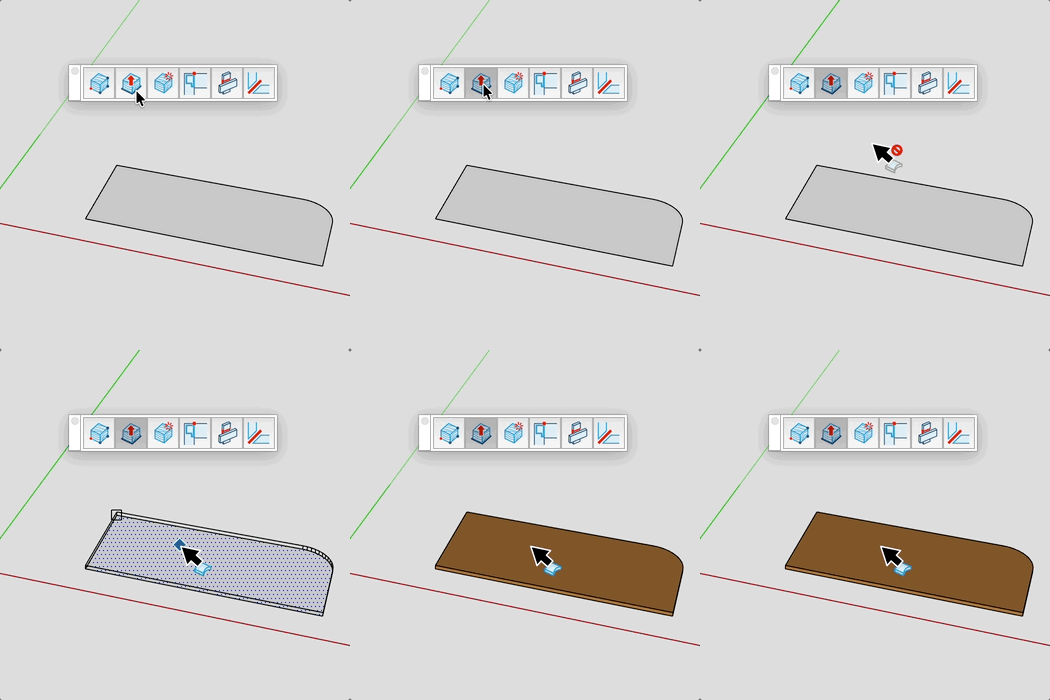
Video demonstration

Demonstration

Solid Wood from Face Tool

Create a solid wood component from an existing face — hover over the face to preview the piece, then click to place it. Material and thickness are set in the board selector.

How it works

  1. Select material and thickness in the board selector that opens automatically
  2. Hover over a face — a preview of the solid wood piece appears, snapping to the nearest vertex
  3. Use Ctrl / Option to flip the direction (which side the wood is placed relative to the face)
  4. Click to create the solid wood component; the original face is removed

Keys

  • Ctrl / Option = Flip the placement direction (reverse face side)
  • Esc = Cancel the operation

VCB Input

  • thickness — type a value to override the board selector thickness

Tips

  • The board selector opens automatically — choose material and thickness first
  • The preview snaps to the closest vertex of the face for accurate origin placement
  • Use Ctrl / Option to toggle which side of the face the solid wood is placed on
  • The face is automatically removed after the component is created

Try this tool for free

AD Wood Free Trial

Fill out this form to receive your free download link.

Thank you for your request!

Your download link is ready. The download will start automatically.

Download Now