Panel Tool
Panels

Panel Tool

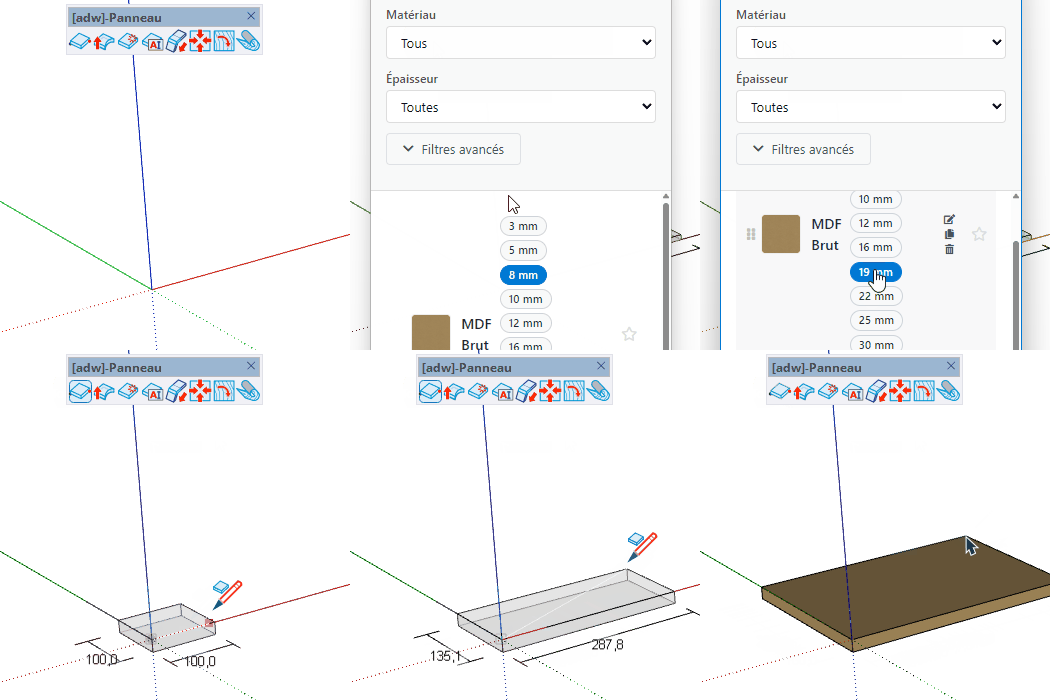
Draw panel-type parts by clicking two points to define length and width โ€” the panel selector sets the material and thickness before you start.
Video demonstration

Demonstration

Panel Tool

Draw panels by clicking two points to define length and width โ€” the board selector sets material and thickness before you start.

How it works

  1. Choose material and thickness in the board selector that opens automatically
  2. Click a first point to set the panel origin
  3. Move the mouse and click a second point to define the panel dimensions
  4. Type dimensions in the VCB to enter exact length and width values

Keys

  • Ctrl / Option = Flip panel direction (reverse Z axis)
  • โ† = Orient panel along green axis
  • โ†’ = Orient panel along red axis
  • โ†‘ / โ†“ = Orient panel along blue axis (default)
  • Esc = Cancel the operation

VCB Input

  • Normal: length ; width โ€” set exact panel dimensions
  • On a vertex: gap โ€” set the snap gap step for vertex inference

Tips

  • The board selector opens automatically on activation โ€” choose material and thickness first
  • Panel dimensions are clamped to the maximum board size defined in the board library
  • Use arrow keys to quickly switch the panel orientation before placing it
  • Hover over a vertex to use gap-snapping for precise positioning

Try this tool for free

AD Wood Free Trial

Fill out this form to receive your free download link.

โœ“

Thank you for your request!

Your download link is ready. The download will start automatically.

Download Now