Panel from Instance
Panels

Panel from Instance

Convert existing SketchUp component instances into Adwood panel-type parts by clicking on them — the tool automatically orients each component and assigns it panel-type attributes.
Video demonstration

Demonstration

Panel from Instance Tool

Convert existing SketchUp component instances into Adwood panels by clicking on them — the tool auto-orients each component and assigns panel attributes.

How it works

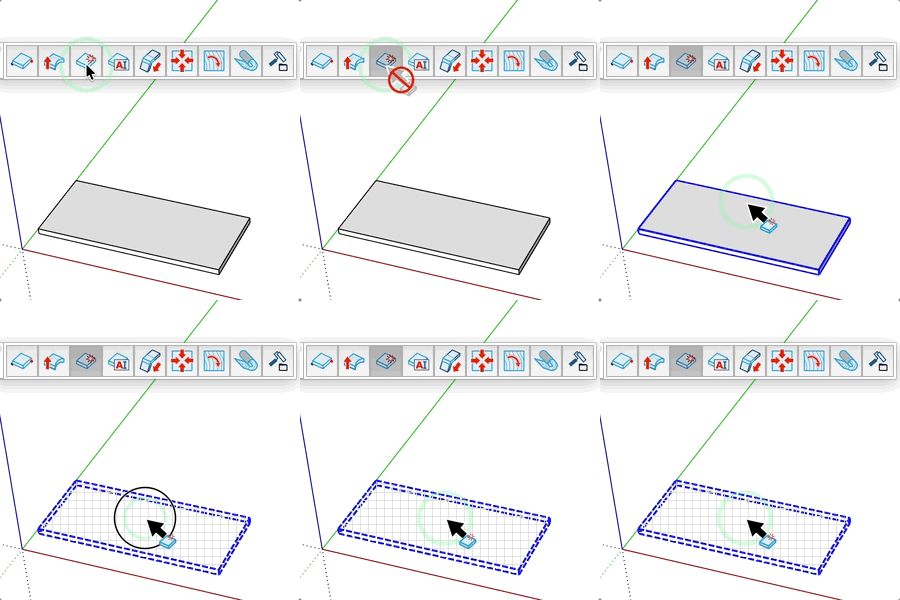
  1. Activate the tool — existing Adwood panels are temporarily hidden so only unconverted components are visible
  2. Hover over a component instance — all instances of that definition are highlighted
  3. Click to convert all instances of that component into Adwood panels at once
  4. The tool exits automatically when all components have been converted

Keys

  • Esc = Cancel the operation

Tips

  • Existing panels are hidden while the tool is active to make it easier to select remaining components
  • All instances of a definition are converted in one click — you don't need to click each one individually
  • The tool automatically orients components so the largest face becomes the panel face
  • Hardware and assembly parts are excluded and will not be converted

Try this tool for free

AD Wood Free Trial

Fill out this form to receive your free download link.

Thank you for your request!

Your download link is ready. The download will start automatically.

Download Now