Vertices Selector Tool
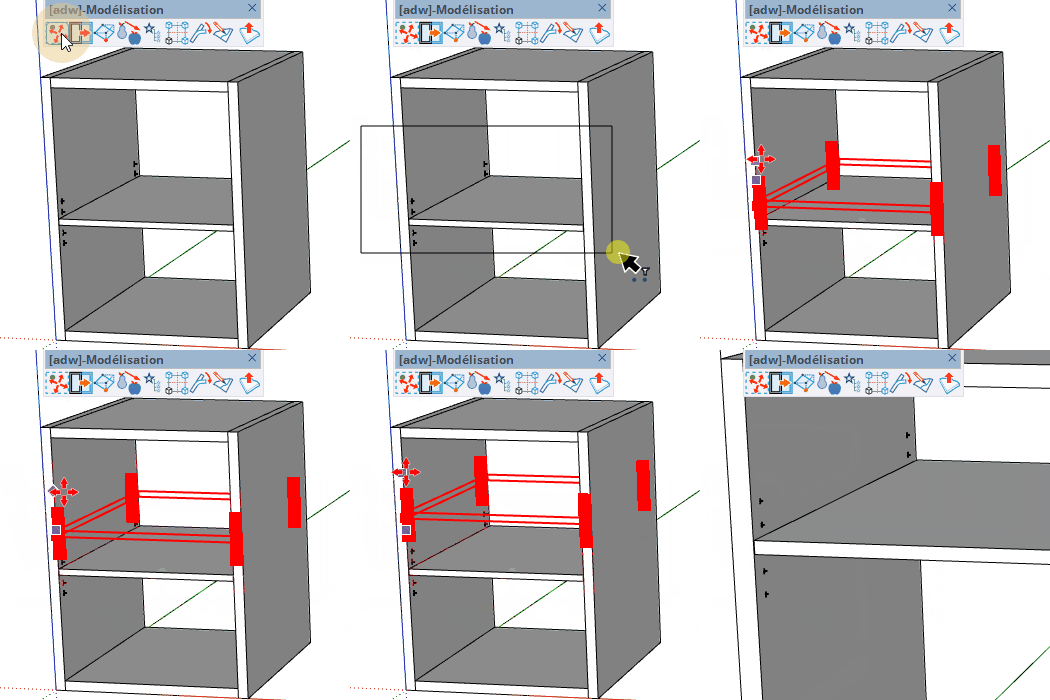
Drag a rectangle over the model to select vertices — including those nested inside groups and components — then stretch them with the Move Vertices tool that opens automatically.
How it works
- Optionally pre-select groups, components or faces to limit the search scope
- Click and drag to draw a selection rectangle on the screen
- Release the mouse — enclosed vertices appear as red dots
- The Move Vertices tool starts automatically to stretch the selected vertices
Keys
- Esc = Cancel the operation
Tips
- The search descends recursively into groups and component instances
- If every vertex of a group or component is enclosed, the whole instance is moved as one — shared component definitions stay untouched
- With no pre-selection, the tool scans the currently active context