Make It Same Tool
Modeling

Make It Same Tool

Replace a panel or component with another by applying the same component definition to all its instances.
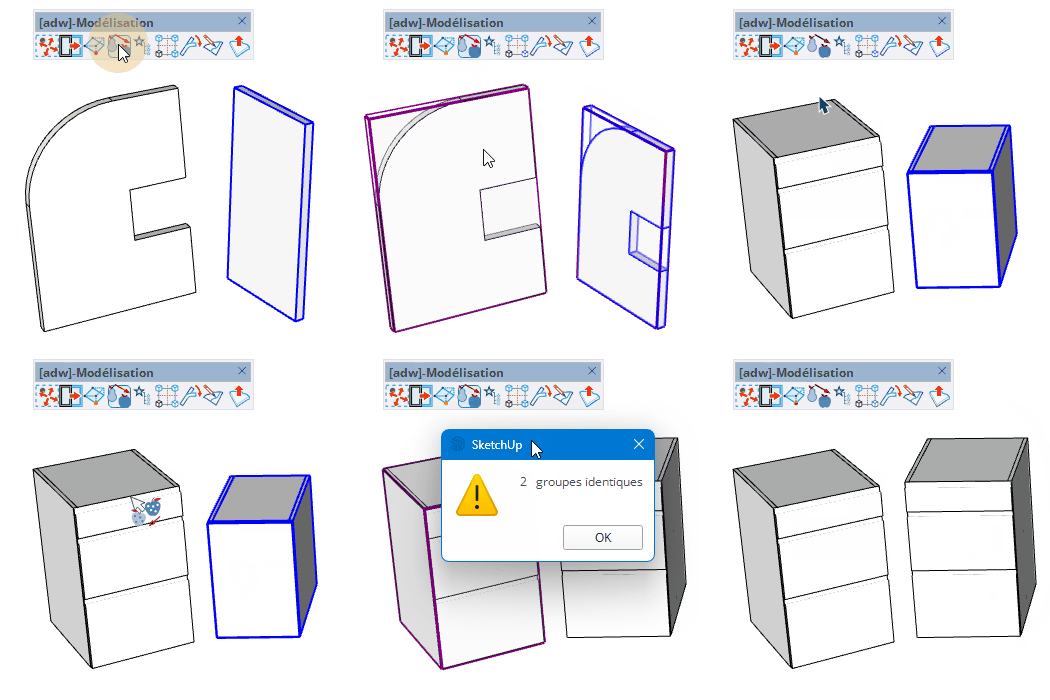
Video demonstration

Demonstration

Make It Same Tool

Replace a panel or component with another one, making all instances identical by applying the same component definition.

How it works

  1. Select the source component or panel in the model before activating the tool
  2. Click on another panel or group to apply the same component definition to it
  3. All replaced instances will share the same definition as the source

Keys

  • Esc = Cancel the operation

Tips

  • The selection must contain only panels, solid woods, or groups before starting
  • Use this tool to standardise repeated components across a design
  • The tool reports the number of identical instances after the operation

Try this tool for free

AD Wood Free Trial

Fill out this form to receive your free download link.

Thank you for your request!

Your download link is ready. The download will start automatically.

Download Now