LED Strip Tool
Lighting

LED Strip Tool

Place an LED light strip between two points in the model, with adjustable height and color temperature.
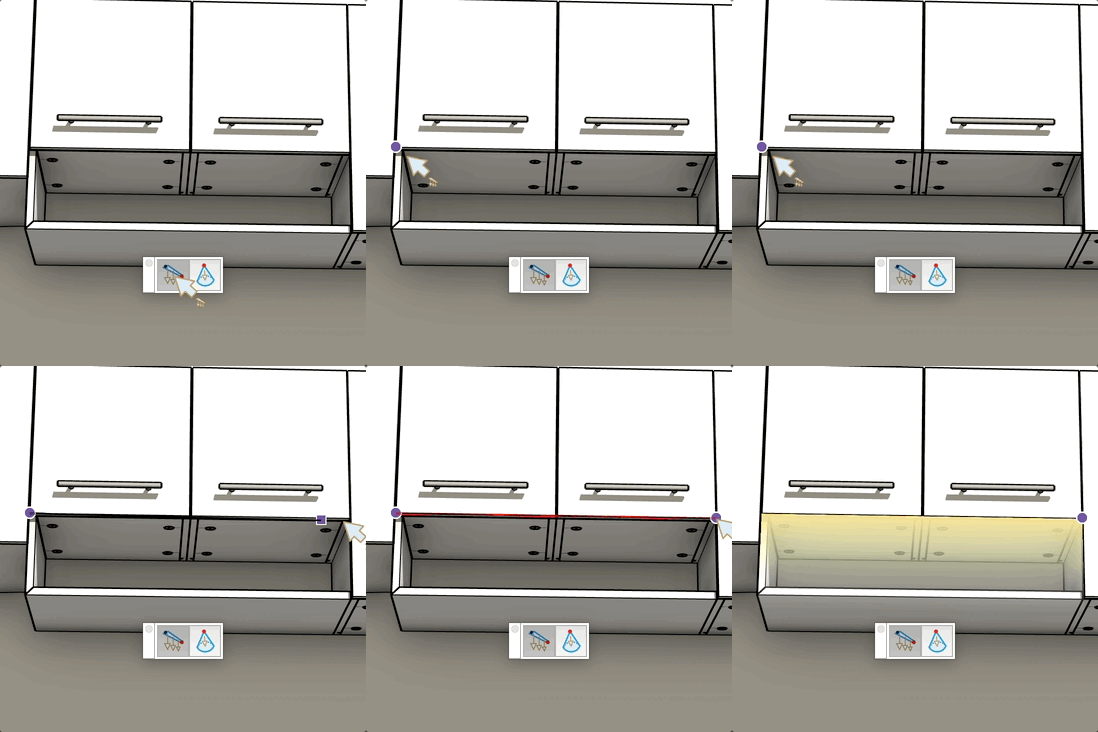
Video demonstration

Demonstration

LED Strip Tool

Place an LED light strip between two points in the model, with adjustable height and color temperature.

How it works

  1. Set the mounting height in the VCB, then click to place the start point
  2. Click a second point to set the end of the strip — it is created instantly
  3. Adjust the color temperature in the temperature dialog that opens automatically

Keys

  • Esc = Cancel the operation

VCB input

  • Before first click: height of the LED strip above the surface
  • After first click: length of the strip (type to force an exact length)

Tips

  • The color temperature dialog lets you choose warm white, neutral, or cold white
  • The strip snaps to edges and faces using standard SketchUp inference
  • Type a length value after placing the first point to draw a strip of precise length

Try this tool for free

AD Wood Free Trial

Fill out this form to receive your free download link.

Thank you for your request!

Your download link is ready. The download will start automatically.

Download Now